




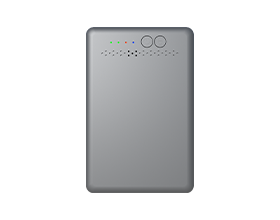












A portable WiFi hotspot is the better fit for most weekend RV trips. A portable wifi hotspot for travel can leave the RV with you, while an RV router suits a coach that needs one regular internet hub. Pick based on mobility, power, and the gear you plan to connect.
Compare Portability and Power Needs
A mobile WiFi hotspot wins when your internet needs to move. It travels from the cab to the campsite, a picnic table, or a trailhead without changing your main setup. An RV router stays in the coach and becomes part of its regular layout.
| Question | Portable Hotspot | RV Router |
| Where does it live? | In a bag, vehicle, or campsite | In one RV location |
| How does it get power? | Internal battery and charging cable | RV power or an outlet, depending on model |
| What trip suits it? | A changing weekend itinerary | Repeated stays with a fixed setup |
| Can you move it for signal? | Yes | Usually less convenient |
Our M47 LTE Hotspot has a 3000mAh battery rated for up to 12 hours of use. Carry a charging cable or power bank for day trips. For a fixed router, review the RV battery reserve and other power loads before leaving a site without hookups.
Portability matters most when you change locations during the day. A permanent power plan matters more when the RV itself is your work or entertainment space.
Check How Your Devices Need to Connect
Your device setup points to the better option. Consider the gear that needs WiFi, any equipment that needs an Ethernet cable, and the online activities your group expects to use. The M47 suits changing groups of phones, tablets, and laptops, while an RV router can fit a vehicle setup that also relies on wired equipment.
Connect Wireless Devices
Use the M47 mobile WiFi hotspot when your phones, tablets, and laptops connect through WiFi. It supports up to 10 connected devices, which can cover a family weekend without asking everyone to join campground guest WiFi.
Connect Wired Equipment
Choose an RV router model with Ethernet ports when a TV, laptop dock, game console, or similar equipment needs a wired connection. Check the exact model before purchase, since port count and connection options vary.
Match Data to Activities
Choose your data plan around what people will do online. Maps and messages use far less data than video calls, streaming, game downloads, or photo backups, even when the same number of devices stays connected.
The M47 suits a wireless device group that changes during a trip. An RV router suits a network that includes regular wired equipment.
Before a trip, use the FCC National Broadband Map to compare reported mobile coverage along your route. The map covers outdoor and in-vehicle service, so coverage inside an RV may vary with location and surrounding conditions.
Decide Whether You Need Internet Only in the RV or Beyond It
Where you use internet during the trip is as important as how you connect. Use the following travel situations to decide whether your connection needs to leave the coach.
- At a campground table: A portable hotspot lets you keep the connection near the people using it.
- During a day trip: Take the M47 mobile WiFi hotspot with a phone, tablet, or laptop after you leave the RV parked.
- Inside the RV each evening: An RV router keeps a regular network location for indoor devices.
- At a repeat campsite: An RV router can suit a stable arrangement around familiar equipment and power access.
Check cellular service before planning a work call or movie night. A window, elevated shelf, or outdoor spot can offer a clearer signal path than a low interior cabinet.
Pick the portable option when the connection follows your plans. Pick the RV router when the connection belongs in the coach.
Pick the Right Internet Device Before Your Next Weekend RV Trip
A portable hotspot is the clear choice for a mobile weekend RV trip, while an RV router serves a fixed RV setup. Check coverage, device count, data needs, charging access, and where you expect to use the connection before you pack.
Hotspot and RV Router Setup Questions
Q1:Can I Move the Same Prepaid SIM Between a Portable Hotspot and an RV Router?
Sometimes. SIM size, network compatibility, plan terms, and APN settings must match the new device. Power off both devices before moving a card, then restart the new device after installation. A device-specific plan can have separate eligibility rules, so check the plan details before changing equipment.
Q1: Can I Move the M47 SIM to Another Device?
No. The SIM built into the M47 is tied to the M47 hotspot and stays in the device. You do not need to remove, replace, or install it in a portable hotspot, RV router, tablet, or any other device. Use a separate compatible data plan for another device.
Q2: Does an RV Router Need Professional Installation?
Usually, no. Many RV routers work with a power connection and guided setup. Professional help can be useful for roof antennas, cable routing, or permanent electrical work. A simple indoor setup gives you a practical way to test placement and coverage before adding more hardware.
Q3: Can a Portable Hotspot Connect to a Laptop by USB?
For M47, connect your laptop through WiFi. Its Type-C port supports charging, while the current M47 information focuses on WiFi device connections. Use the included setup information for the current connection steps, then test your laptop before a trip.
Q4: Can an RV Router Use a Campground Ethernet Connection?
Yes, a router with a WAN Ethernet port can use a campground Ethernet service when the site offers one. You may need to sign in through a campground portal first. Keep your cellular option ready for campgrounds where shared internet becomes slow during busy evening hours.
Q5: Can a Portable Hotspot Be Used Outside the RV?
Yes, you can use a portable hotspot anywhere covered cellular service reaches. Keep it dry, place it away from prolonged direct sun, and bring a battery pack for long outdoor sessions. Your phone or laptop needs to remain close enough to maintain a strong WiFi signal.